Getting started with the Grants Portal
We want to support you in getting started with our Grants Portal and make the process as simple and straightforward as possible.
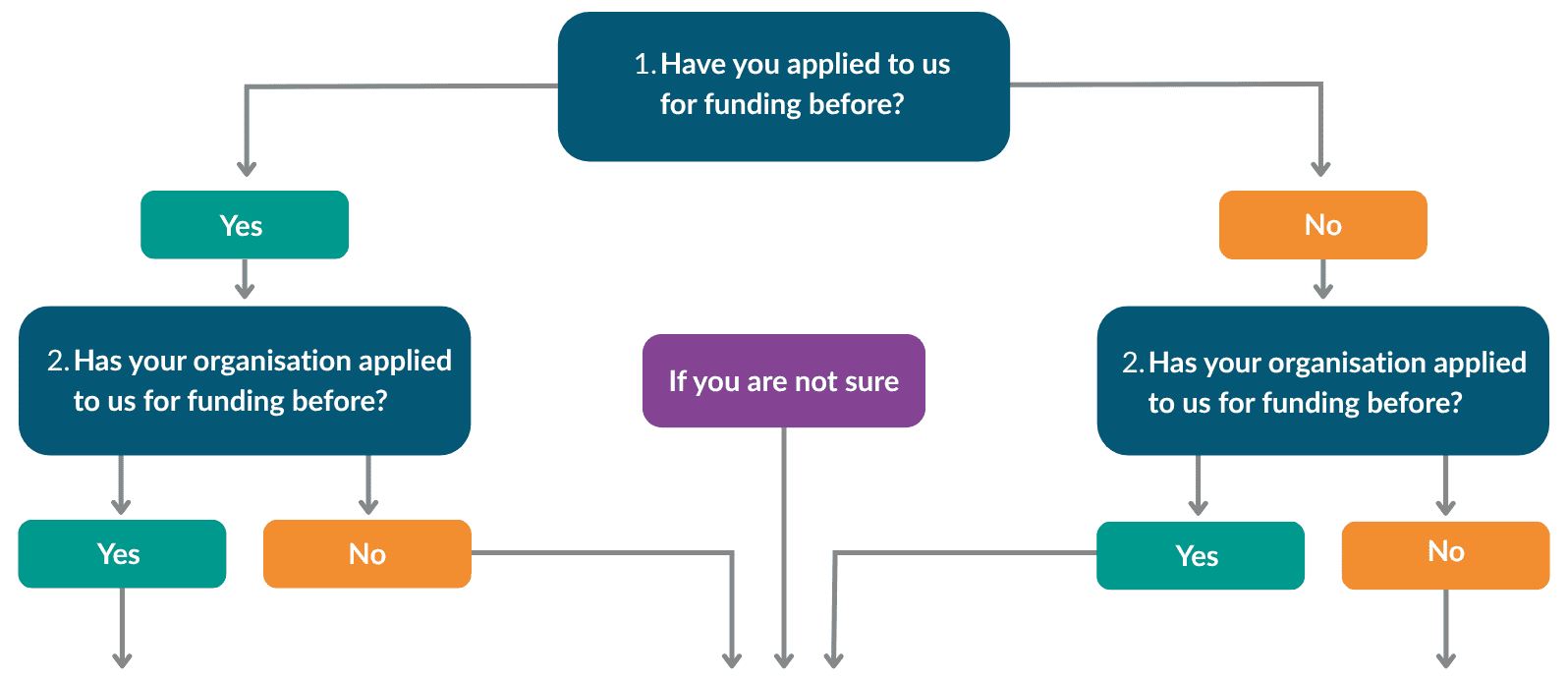
Follow the flowchart below and answer two quick questions about you and your organisation. We’ll guide you through the right steps, whether you’re applying for funding with us for the first time or have applied before. If you need any help along the way, don’t worry, we’re always happy to help!
Register for the Grants Portal
Even though both you and your organisation
have applied to us before, you need to head to our
Grants Portal to register and get started.
Complete our short form first
We just need a few details from you so we can
make sure everything is in place before you register.
Register for the Grants Portal
As neither you or your organisation have applied to us before,
go to our Grants Portal to register and get started.
Need help?
Step-by-Step Guidance
Follow our short guide to help you use the grants portal, from getting started to managing your application and reporting requirements
Frequently Asked Questions
Find answers to questions about registering, using the portal and managing your applications.
Learn & Share Drop-In
Join one of our friendly Learn & Share drop-in sessions to ask questions and get support.
Further questions
If you have any questions or aren’t sure what to do next, we’re happy to help. Just email us at [email protected] with your organisation details or call 01904 929500.
Contact the Grants team about the new grants portal
Call Grants on 01904 929 500
Email [email protected]